
Setup guide
Panduan setup
设定教学
How to get your OpenAI key
CloseChat's AI runs on your own OpenAI key. Get it in 3 steps — just a few clicks, no tech skills needed — then paste it into CloseChat.
OpenAI charges your card directly, only for what you use. CloseChat adds nothing on top.
-
1
Create an OpenAI account
- Go to platform.openai.com and sign up with Google, Apple, Microsoft or your email.
- Always sign in the same way — your key and credit live in this account.
-
2
Add a card and buy credit
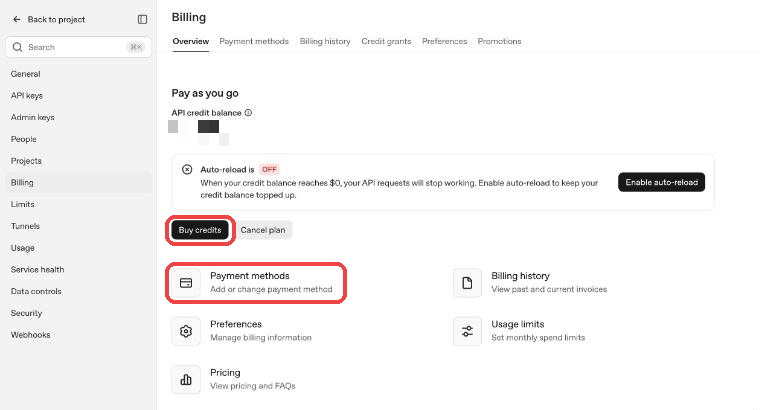
- Click Settings (bottom left) → Billing.
- Click Payment methods and add your card.
- Click Buy credits. US$5–10 is enough to start.
- Tip: under Usage limits you can set a monthly maximum, so you never spend more than you planned.
-
3
Create the key
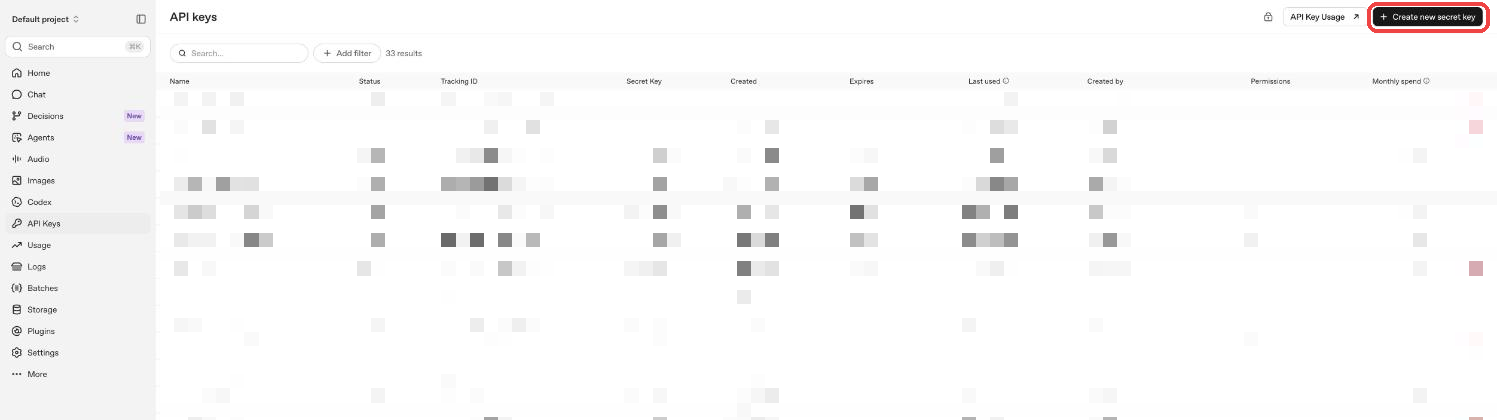
- In the left menu click API keys, then Create new secret key (top right).
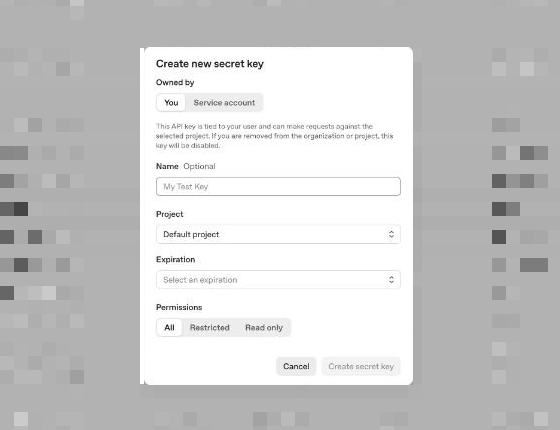
- Name: type CloseChat, so you know where it is used.
- Project: leave Default project.
- Expiration: choose the longest option — otherwise the AI stops working when the key expires.
- Permissions: leave All.
- Click Create secret key, then Copy. The key starts with sk- and is shown only once. Closed it before copying? Just create a new one.
-
4
Paste it into CloseChat
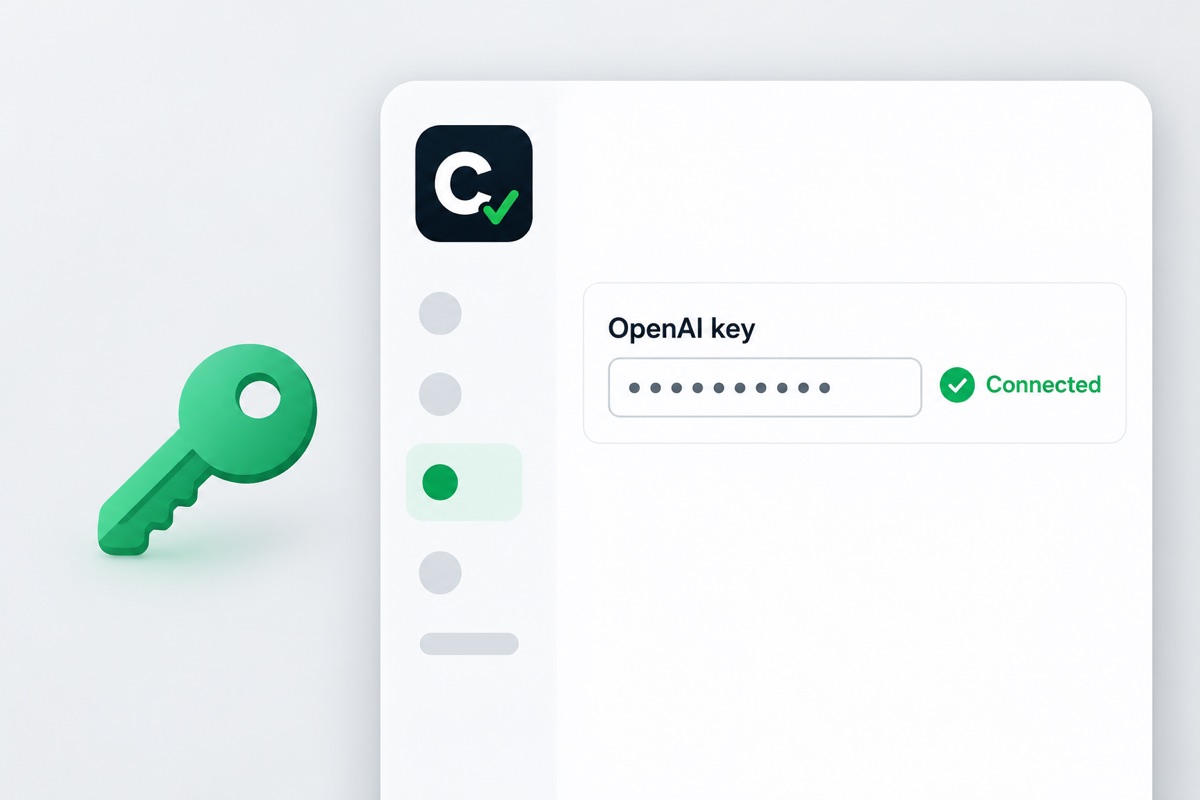
- First time: the CloseChat panel on WhatsApp Web shows an OpenAI key row. Paste your key and press Test. When it says Connected, you're done.
- To change it later: More (⋯) → Settings → AI Configuration → API Key.
Keep your key safe
- Your key works like a password for your OpenAI credit. Never send it on WhatsApp, by email or in a screenshot.
- CloseChat stores it encrypted and never shows it again.
- Think it leaked? Delete it on OpenAI's API keys page, create a new one and paste the new one into CloseChat.
Stuck? WhatsApp us and we'll help.
Cara dapatkan OpenAI key
AI dalam CloseChat guna OpenAI key korang sendiri. 3 langkah je dah dapat key, tekan beberapa kali je, tak perlu pandai IT. Lepas tu tampal dalam CloseChat.
OpenAI caj terus pada kad korang, ikut berapa yang korang guna je. CloseChat tak tambah apa-apa caj.
-
1
Buka akaun OpenAI
- Pergi ke platform.openai.com dan daftar guna Google, Apple, Microsoft atau email.
- Log masuk guna cara yang sama setiap kali — key dan baki kredit ada dalam akaun ni.
-
2
Tambah kad dan beli kredit
- Tekan Settings (bawah kiri) → Billing.
- Tekan Payment methods dan tambah kad.
- Tekan Buy credits. US$5–10 dah cukup untuk mula.
- Tip: kat Usage limits boleh letak had sebulan, supaya tak terbelanja lebih.
-
3
Buat key
- Kat menu kiri tekan API keys, lepas tu tekan Create new secret key (atas kanan).
- Name: tulis CloseChat, supaya senang ingat.
- Project: biar Default project.
- Expiration: pilih tempoh paling panjang — kalau tak, AI berhenti bila key tamat.
- Permissions: biar All.
- Tekan Create secret key, lepas tu tekan Copy. Key mula dengan sk- dan keluar sekali je. Tertutup sebelum copy? Buat key baru je.
-
4
Tampal dalam CloseChat
- Kali pertama: panel CloseChat kat WhatsApp Web ada baris Kunci OpenAI. Tampal key, tekan Uji. Bila keluar Disambungkan, dah siap.
- Nak tukar lepas ni: Lagi (⋯) → Tetapan → Konfigurasi AI → Kunci API.
Jaga key elok-elok
- Key ni macam password untuk kredit OpenAI korang. Jangan hantar guna WhatsApp, email atau screenshot.
- CloseChat simpan key dalam bentuk yang disulitkan dan tak akan tunjuk lagi.
- Rasa key dah terdedah? Padam kat halaman API keys OpenAI, buat yang baru, lepas tu tampal dalam CloseChat.
Tersangkut? WhatsApp kami, kami tolong.
怎么拿 OpenAI key
CloseChat 的 AI 用你自己的 OpenAI key。3 步就能拿到,点几下而已,不懂电脑也能轻松搞定;拿到后贴进 CloseChat 就好。
费用由 OpenAI 直接从你的卡扣,用多少算多少。CloseChat 不另外收费。
-
1
注册 OpenAI 账号
- 打开 platform.openai.com,用 Google、Apple、Microsoft 或 email 注册。
- 以后都用同一个方式登录,你的 key 和余额都在这个账号里。
-
2
绑卡、充值
- 点左下角 Settings → Billing。
- 点 Payment methods,加上你的卡。
- 点 Buy credits 充值,一开始 US$5–10 就够。
- 小提示:在 Usage limits 可以设每月上限,不会花超过预算。
-
3
建立 key
- 左边菜单点 API keys,再点右上角 Create new secret key。
- Name:填 CloseChat,以后认得出是哪里在用。
- Project:保持 Default project。
- Expiration:选最长的期限,不然到期后 AI 就停了。
- Permissions:保持 All。
- 点 Create secret key,再点 Copy。key 以 sk- 开头,只会显示一次;还没复制就关掉了,重新建一个就好。
-
4
贴进 CloseChat
- 第一次:WhatsApp Web 上的 CloseChat 面板会有 OpenAI key 那一行。贴上 key,按 测试,显示 已连接 就完成了。
- 以后要换:更多(⋯)→ 设置 → AI 配置 → API 密钥。
保护好你的 key
- 这个 key 就像你 OpenAI 余额的密码,不要用 WhatsApp、email 或截图传给任何人。
- CloseChat 会加密保存,之后不会再显示出来。
- 怀疑外泄了?到 OpenAI 的 API keys 页面删掉它,建一个新的,再贴进 CloseChat。
卡住了?WhatsApp 我们,我们帮你。